



.svg)
When you set out to design your own medal, the creative possibilities are endless—but the quality of your final product depends heavily on the kind of artwork (file) you provide.
Whether you're coming to us with design ideas for medals, a sketch, or a finished digital image, understanding the difference between file types is key to transforming your vision into a medal-worthy masterpiece.
What Is “Usable Art” for Medal Production?
To produce high-quality, detailed medals, we require artwork in a specific format known as original art. This kind of file ensures that your medal design stays crisp and accurate, whether it's the size of a dime or a dinner plate.
Let’s break it down.
Original Art vs. Raster Images
Original art is created using paths, not pixels. This means it can be scaled infinitely without losing clarity, essential for intricate medal engraving or casting.
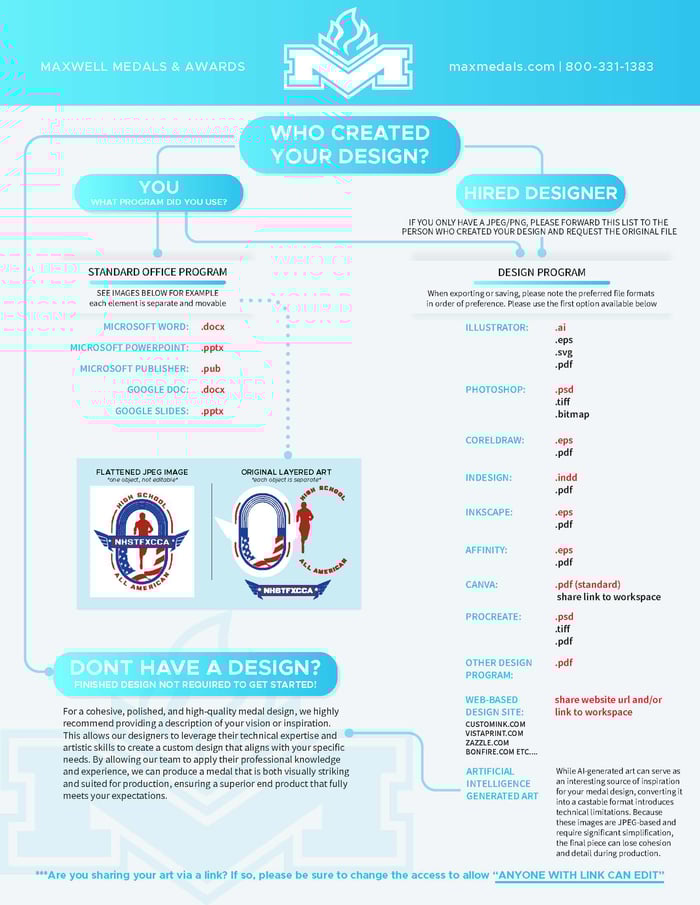
Acceptable original art file types include, in order of preference:
|
ILLUSTRATOR |
.ai |
|
.eps |
|
|
.svg |
|
|
|
|
|
PHOTOSHOP (layered) |
.psd |
|
.tiff |
|
|
.bitmap |
|
|
CORELDRAW |
.eps |
|
|
|
|
INDESIGN |
.indd |
|
|
|
|
INKSCAPE |
.eps |
|
|
|
|
CANVA |
|
|
sharelink |
|
|
PROCREATE |
.psd |
|
|
|
|
WEB-BASED DESIGN SITE customink.com vistaprint.com bonfire.com etc… |
Share url or link to workspace |
On the other hand, Raster Images (unusable) are made of pixels. This includes:
- .JPG or .JPEG
- .PNG
- .GIF
- .BMP
These files are resolution-dependent and become blurry or pixelated when enlarged. They are considered “flattened” images and cannot be used directly for medal production.
Even if you rename or re-save a .JPG as a .PDF or paste it into Word or PowerPoint, it doesn’t convert the file into a usable format. It's still a raster image.
What If I Only Have a JPEG or PNG?
This is a common situation. We recommend reaching out to the person who originally created your logo or artwork and requesting the “original file.” If they used design software like Illustrator, CorelDRAW, or Photoshop, they should have it.
If you’re unable to obtain the original file, our design team can assist by recreating your artwork in a usable format. However, this may add extra design time and cost, depending on the complexity of the project.
A Note on AI-Generated Images
While AI-generated art can be a useful source of inspiration for your medal design, converting it into a castable format (to create a medal) introduces technical limitations. Because these images are JPEG-encoded and require significant compression, the final piece may lose cohesion and detail during production.
Don’t Have a Design or Artwork?
For a cohesive, polished, and high-quality medal design, we recommend providing a description of your vision or inspiration. This allows our designers to leverage their technical expertise and artistic skills to create a custom design that aligns with your specific needs.
By allowing our team to apply their professional knowledge and experience, we can produce a medal that is both visually striking and suited for production, ensuring a superior end product that fully meets your expectations.
Bring Your Vision to Life
When you come to us to design your own medal, we want to make sure your artwork translates beautifully into metal, acrylic, or color. By providing the right kind of file, you’re setting the stage for a smoother design process and an excellent finished product.
Have questions or not sure what steps to take next? Check out our handy graphic below for more clarification, and reach out to our experts! We’re here to help you through every step of the process—from the initial medal design to the final product that you’ll be proud to present.
Ready to get started with your unique medal designs? Contact us today, and let’s turn your ideas into a one-of-a-kind award.


.svg "Maxwell Medals & Awards Footer Logo")
